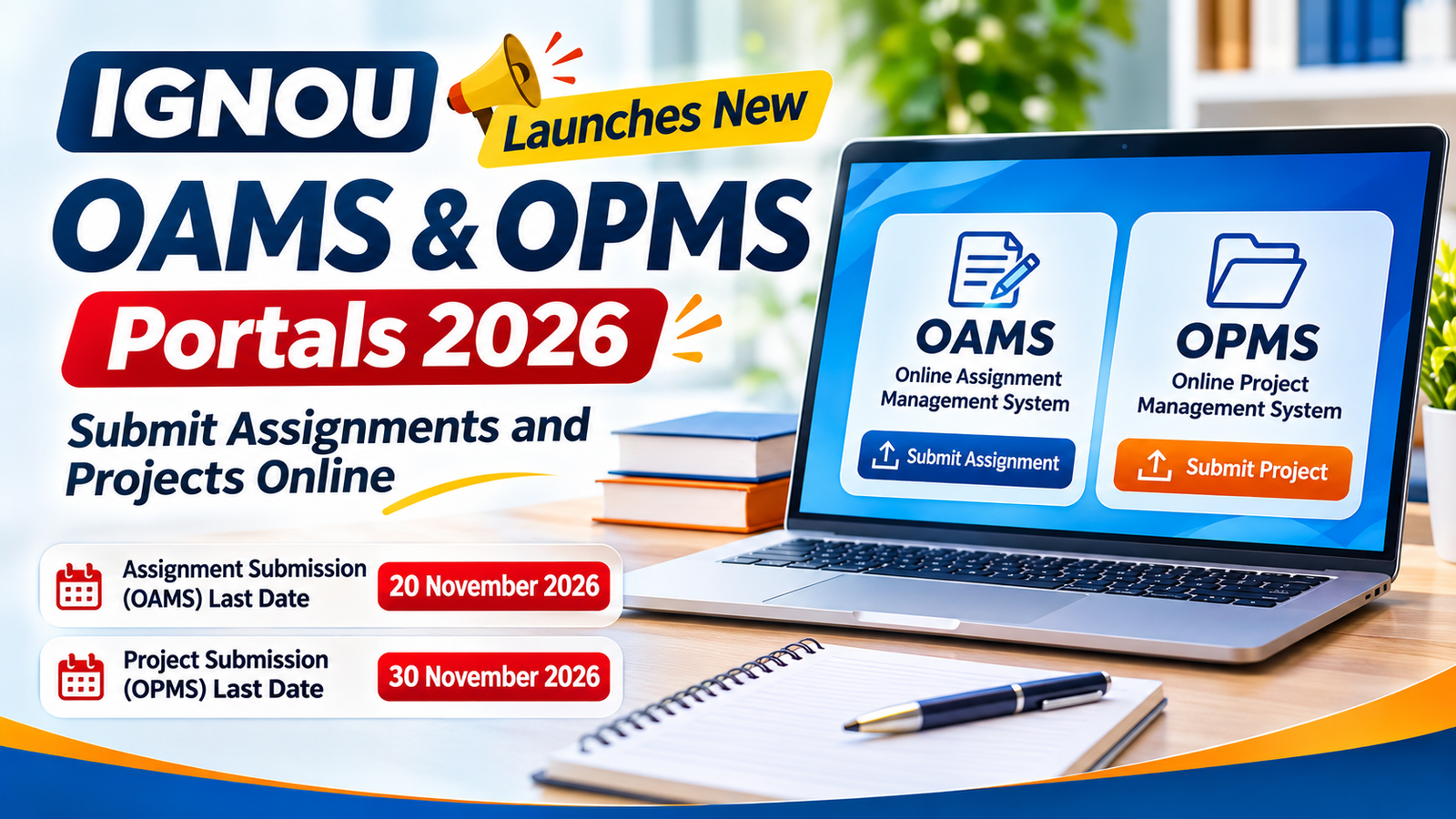
IGNOU Launches New OAMS & OPMS Portals 2026: Submit Assignments and Projects Online
IGNOU has introduced two dedicated online systems to make academic submissions easier for eligible students. The new Online Assignment Management System (OAMS) and Online Project Management System (OPMS) provide digital facilities for submitting assignments, project reports, dissertations and other academic documents.
With these new facilities, eligible students enrolled in IGNOU's Open and Distance Learning (ODL) and Online Programmes can complete their submissions through the university's online systems without following the traditional physical submission process wherever online submission is applicable.
The OAMS notification was issued on 28 October 2026 for the December 2026 Term-End Examination (TEE). IGNOU has also included OAMS and OPMS in its official Student Services section.
In this article, students can learn about both portals, their login process, document requirements, important submission dates and the steps to follow while uploading assignments and project reports.
- OAMS assignment submission deadline: 20 November 2026.
- OPMS project/dissertation submission deadline: 30 November 2026, 11:59 PM.
What Are the New IGNOU OAMS and OPMS Portals?
OAMS and OPMS are two different online systems introduced to manage academic submissions. Both are listed under IGNOU Student Services, but they are used for different types of academic work.
1. IGNOU Online Assignment Management System (OAMS)
The Online Assignment Management System, commonly known as OAMS, is a digital platform for submitting course-wise assignments online.
IGNOU issued an official notification dated 28 October 2026 announcing the launch of OAMS for eligible learners enrolled in ODL and Online Programmes for the December 2026 TEE.
Students can access the system through their IGNOU Samarth student accounts and upload their completed assignments according to the prescribed guidelines.
Key features of OAMS:- Online submission of eligible course-wise assignments.
- Access through the IGNOU Samarth student account.
- Assignment question paper access.
- PDF document upload facility.
- Submission details available through the student dashboard.
- Digital submission without a physical visit for eligible online submissions.
Official Login: IGNOU Samarth Student Portal
2. IGNOU Online Project Management System (OPMS)
The Online Project Management System (OPMS) is a dedicated platform for submitting eligible project-related academic documents.
Students can use this system for submitting project reports, dissertations, internship reports and other applicable academic work according to their programme requirements.
Academic documents covered by OPMS may include:- Project Reports
- Dissertation Reports
- Internship Reports
- Practicum Reports
- Field Work Reports
- Other eligible project-related submissions
Students should check the programme-specific guidelines because document requirements and approval procedures may differ between programmes.
Official Portal: IGNOU OPMS Portal
Difference Between IGNOU OAMS and OPMS
Although both systems support online academic submissions, they are designed for different purposes. Here is a comparison to help students understand which portal they need to use.
| Details | OAMS | OPMS |
|---|---|---|
| Full Form | Online Assignment Management System | Online Project Management System |
| Main Purpose | Assignment submission | Project and dissertation submission |
| Documents | Course-wise assignments | Project reports, dissertations and internship reports |
| Login | IGNOU Samarth | IGNOU Samarth/OPMS access |
| Submission Format | PDF and other required documents as instructed | |
| December 2026 Deadline | 20 November 2026 | 30 November 2026 |
How to Submit IGNOU Assignments Online Through OAMS?
Eligible students can follow the steps below to submit their assignments through the new OAMS portal.
Step 1: Visit the IGNOU Samarth Portal
Open the official IGNOU Samarth Student Portal:
https://ignou.samarth.edu.in/index.php/site/login
Enter your enrolment number, password and the required captcha details to access your student dashboard.
Step 2: Open the OAMS Facility
After logging in, locate the Online Assignment Management System option under the available student services. Open the OAMS dashboard and check the instructions displayed on the screen.
Step 3: Check Your Course Details
Review the programme and course information available in your account. Select the course for which you need to submit an assignment.
Make sure that the course code and examination session are correct before uploading your document.
Step 4: Download the Current Assignment Questions
Use the Assignment Question Paper option to access the applicable assignment questions. Check that the questions belong to the correct course and session.
Step 5: Prepare Your Assignment PDF
Complete your assignment according to the prescribed academic guidelines. The OAMS student manual instructs students to submit their completed answers as a single PDF file for each course.
Keep the following information on the assignment's first page:
- Student Name
- Enrolment Number
- Programme Name
- Course Code
- Study Centre Code
- Regional Centre Details
- Email Address
Important OAMS file requirements:
- Accepted format: PDF.
- Maximum file size: 20 MB.
- Upload one combined PDF file for each course.
- Ensure all pages are clear and readable.
- Check that the document is correctly oriented and complete.
Step 6: Upload Your Assignment
Select the relevant course and use the upload option to choose your prepared PDF file.
Review the uploaded document using the available View option. Once you have confirmed that the correct file has been selected, follow the portal instructions and click Final Submit.
Step 7: Keep Your Submission Record
After completing the submission, check the dashboard for the available submission details. Keep a copy of the uploaded assignment and any confirmation or submission record for future reference.
How to Submit IGNOU Projects and Dissertations Through OPMS?
Students who need to submit eligible project reports, dissertations or internship documents can use the OPMS facility. Follow the steps below to understand the process.
Step 1: Open the Official OPMS Portal
Visit the official IGNOU Online Project Management System:
https://opms.ignou.ac.in/ui-service/projectDetailsUrl
Access the portal using the applicable student login process.
Step 2: Check Your Eligibility
Before submitting your report, verify the following:
- Your course registration is valid and not time-barred.
- The project or dissertation component is applicable to your programme.
- You have fulfilled the prescribed programme requirements.
- You have not already passed the same project component in an earlier TEE.
As per the OPMS guidelines, students who have already passed the applicable component should not submit it again. Students who failed or whose cases are under Unfair Means may resubmit as permitted by the instructions.
Step 3: Pay the Applicable Project Fee
Students must pay the applicable project, internship or dissertation evaluation fee through their IGNOU Samarth account.
According to the OPMS instructions, the project upload link becomes available after the applicable fee has been submitted through the Samarth portal.
Step 4: Prepare Your Project Documents
Prepare the final report according to your programme's prescribed project manual and approval requirements.
Depending on the programme, the following documents may be required:
- Approved Project Proposal or Synopsis
- Signed Supervisor Biodata
- Project or Synopsis Approval Document
- Complete Project or Dissertation Report
- Required Declarations and Certificates
- Other programme-specific supporting documents
Step 5: Prepare the Required PDF Files
Scan your documents properly and prepare separate PDF files for the relevant upload sections.
The OPMS guidelines specify the following maximum file sizes:
- Signed Supervisor Biodata: 5 MB.
- Approval of Synopsis or Project Proposal: 5 MB.
- Project Proposal or Synopsis: 10 MB.
- Complete Project Report with Declarations: 40 MB.
Step 6: Upload Your Project Report
Log in to the OPMS portal and select the relevant project or dissertation submission section.
Upload the final report and supporting documents in their respective sections. Check that the files are correctly selected and that all required details match your student records.
Step 7: Complete Final Submission
Review all the uploaded documents before completing the final submission. The university states that incomplete submissions will not be evaluated.
After successful submission, keep your fee receipt and copies of all uploaded documents safely.
IGNOU OAMS and OPMS Last Dates for December 2026 TEE
Students preparing for the December 2026 Term-End Examination should carefully check the applicable deadlines for assignment and project submissions.
| Submission | Last Date |
|---|---|
| OAMS Online Assignment Submission | 20 November 2026 |
| OPMS Project/Dissertation Submission | 30 November 2026, 11:59 PM |
These dates are based on the respective December 2026 submission instructions available through IGNOU. Students should complete their submissions well before the deadline.
Already Submitted Your IGNOU Assignment or Project? Do You Need to Upload It Again?
Many students may be confused about whether they need to upload their documents again after the introduction of the new systems.
For OAMS Assignments
According to the official IGNOU notification dated 28 October 2026, students who have already submitted their assignments at their respective Study Centre or Regional Centre are not required to upload the same soft copies again through OAMS.
For OPMS Projects
Students who have already submitted their project reports through the applicable earlier submission channels, including the Regional Centre, LMS or Student Evaluation Division, are not required to upload the same reports again through OPMS.
Check your previous submission records and the applicable official instructions before making a fresh submission.
Common Problems Students May Face While Using OAMS and OPMS
Students may experience technical or document-related issues while submitting assignments and project reports. Here are some common problems and the steps to consider.
1. Unable to Log In
Check your enrolment number and password. If the issue continues, use the official account recovery facility or contact the appropriate IGNOU support channel.
2. Assignment Upload Failed
Check whether your PDF is within the permitted 20 MB file size and follows the required format. Ensure that the internet connection is stable before uploading again.
3. Course Is Not Showing in OAMS
Verify your course registration and eligibility for the current submission session. Contact IGNOU if the eligible course is still unavailable.
4. Project Upload Link Is Not Available
Check whether the applicable project or internship fee has been paid through Samarth. OPMS makes the upload facility available after the required fee submission.
5. Unable to Submit the Final Project
Review all required document sections, file sizes and submission details. Incomplete submissions may not be evaluated.
Important Tips Before Submitting IGNOU Assignments and Projects Online
- Always use the official IGNOU portals.
- Check your enrolment number and course codes carefully.
- Read the latest assignment and project guidelines.
- Prepare clear and readable PDF documents.
- Do not wait until the last date to upload your work.
- Keep copies of your fee receipts and submission records.
- Avoid uploading duplicate assignments or project reports.
- Contact your Regional Centre if you face programme-specific submission issues.
Frequently Asked Questions About IGNOU OAMS and OPMS
1. What is the IGNOU OAMS Portal?
OAMS stands for Online Assignment Management System. It is an online facility that allows eligible IGNOU students to submit course-wise assignments through their Samarth student accounts.
2. What is the IGNOU OPMS Portal?
OPMS stands for Online Project Management System. It provides an online facility for submitting eligible project reports, dissertations, internship reports and other academic documents.
3. When was the IGNOU OAMS Portal launched?
IGNOU issued its official notification announcing OAMS on 28 October 2026 for online assignment submission for the December 2026 TEE.
4. What is the last date for IGNOU OAMS submission in 2026?
The announced last date for OAMS assignment submission for December 2026 TEE is 20 November 2026.
5. What is the last date for IGNOU OPMS submission in 2026?
The final submission deadline for eligible project, dissertation and internship reports through OPMS for December 2026 TEE is 30 November 2026 at 11:59 PM.
6. Can IGNOU students submit handwritten assignments through OAMS?
Yes. The OAMS student manual instructs students to prepare their assignment answers and upload them as a single PDF file for each course.
7. What is the maximum file size for OAMS assignments?
The maximum permitted file size specified in the OAMS manual is 20 MB per course.
8. Is project fee payment necessary before OPMS submission?
Yes. Students must pay the applicable project or internship fee through their Samarth account. The upload link becomes available after the fee submission.
9. Do I need to upload my assignment again if I have already submitted it physically?
No. IGNOU's OAMS notification states that students who have already submitted their assignments at their Study Centre or Regional Centre are not required to upload the same assignments again through OAMS.
10. Where can I find official IGNOU OAMS and OPMS links?
Students can access OAMS through the IGNOU Samarth Student Portal and OPMS through the official IGNOU Online Project Management System link provided in the Student Services section.
Official IGNOU Links and Resources
Students should use the following official links for login, submission instructions and university updates.
- IGNOU Samarth Student Login
- IGNOU OPMS Portal
- OAMS Student User Manual
- IGNOU Student Services
- IGNOU Official Website
Conclusion
The introduction of OAMS and OPMS provides eligible IGNOU students with dedicated online facilities for submitting assignments and project-related documents. Students can use these systems to complete their academic submissions digitally by following the university's prescribed guidelines.
For the December 2026 TEE, students should remember the OAMS assignment deadline of 20 November 2026 and the OPMS project submission deadline of 30 November 2026. Preparing documents in advance and checking the official portal instructions can help avoid last-minute submission problems.
Keep visiting IGNOUProjects.in for the latest IGNOU assignment, project, dissertation, synopsis and examination-related updates.
Need Help With Your IGNOU Project or Dissertation?
IGNOUProjects provides academic guidance and support for project reports, synopsis, dissertations, practical files and other academic requirements.
WhatsApp: +91 9821933855
Email: info@ignouprojects.in
Disclaimer: IGNOUProjects.in is an independent academic support platform and is not affiliated with or operated by IGNOU. Students should refer to official university notifications for final submission requirements and deadlines.